Introduction to Glintia
Glintia is a browser-based video editor for animated videos, whiteboard explainers and edited footage, with AI tools built in. You build scenes by dragging characters, elements, text and media onto a canvas, then export a finished video. There is nothing to install and no design skills are required.
When you create a design, you choose what you’re making, and the editor shows the tools for that job:
- Animation: characters, actions and keyframes
- Whiteboard: hand-drawn explainer style
- Video Editor: edit footage, subtitles and audio
- AI Builder: generate content with AI
- Full Editor: every tool in one place
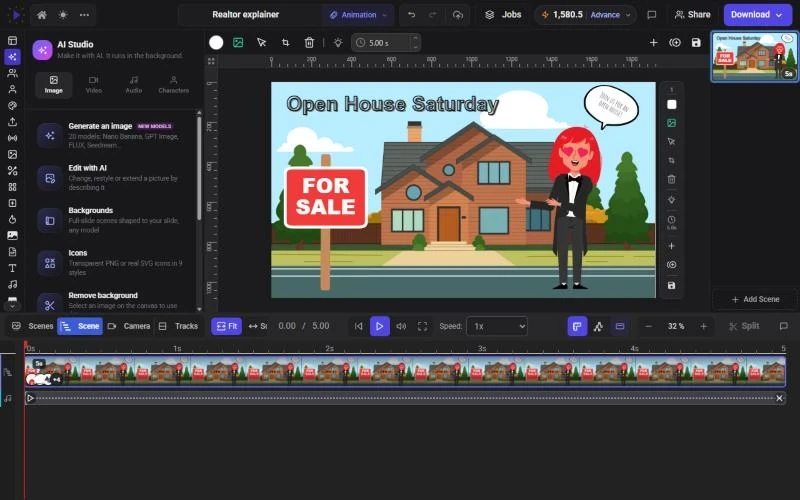
Key Features
Section titled “Key Features”- Character Builder - Build custom characters that come with 76 prebuilt actions and 30 facial expressions, or upload your own artwork and rig it with a guided wizard
- Whiteboard Videos - 40 drawing hands, hand-drawn styles for vector artwork, and a Trace style that sketches your photos before revealing them
- Text-to-Speech - 592 AI voices in 82 languages, with automatic character lip-sync, on every plan
- Templates Library - 110 scene templates, 288 intro and outro designs and around 400 animated text designs, in landscape, portrait and square
- Subtitles - Automatic captions with 51 style presets and AI translation into 20 languages
- AI Animation Director - Describe your video, pick a template and a character, and get an editable draft with script, voiceover, visuals and music
- Export Options - MP4 in Full HD on every plan (square designs in 2K, 1440×1440, on Advance and Enterprise), plus GIF, JPG, and transparent WebM or PNG
Who is Glintia for?
Section titled “Who is Glintia for?”Glintia is perfect for:
- Entrepreneurs - Create promotional videos and product demos
- Educators - Build engaging learning content
- Marketers - Produce social media and ad content
- Content Creators - Make animated stories and explainers
- Small Businesses - Professional videos without the agency cost
- HR Teams - Training and onboarding materials
Plans and Free Trial
Section titled “Plans and Free Trial”Glintia has four plans: Basic, Pro, Advance and Enterprise. Basic, Pro and Advance start with a 7-day free trial. A payment card is required, and you won’t be charged if you cancel before the trial ends. The trial includes a starter allowance of exports and AI credits, and trial exports carry a Glintia watermark. Paid plans export without a watermark and include a commercial license.
Next Steps
Section titled “Next Steps”Ready to get started? Check out the Quick Start Guide to create your first animation in minutes.